
So it’s Friday and you need to get home but you still have some work to do. What should you do? Well you have logmein installed, so great, you can leave your computer on and remotely access the computer from home and finish off your work. You go into the battery power settings and set it to never go to sleep when plugged in.
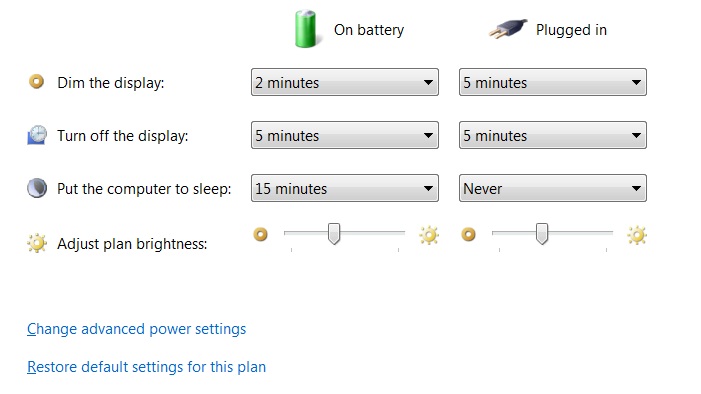
Happily you leave and on Sunday you try to access your computer to only realize it’s not online. What happened? It turns out there are two settings, one to put your computer to sleep after a certain amount of time and a second setting to hibernate after a certain amount of time. If you go into the advanced settings of your power settings, you will see a section titled “Sleep”, in this section is “Hibernate after”, change the value for “Plugged in (minutes):” to 0 and that will prevent your machine from hibernating.
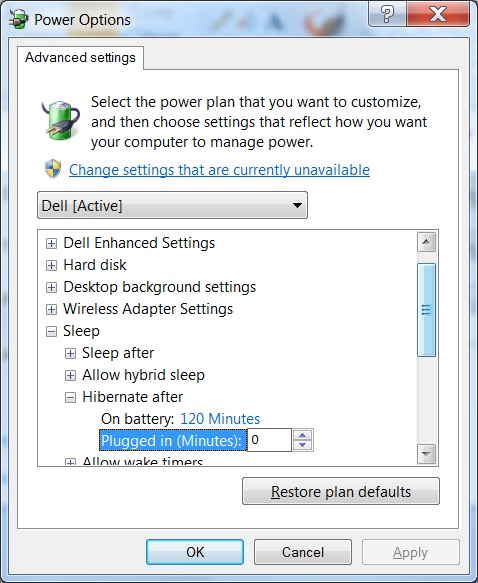
Changing those two settings will prevent your computer from turning off while plugged in.
